The problem explored
Connecting overdue invoice checks with a follow-up message and a traceable log.
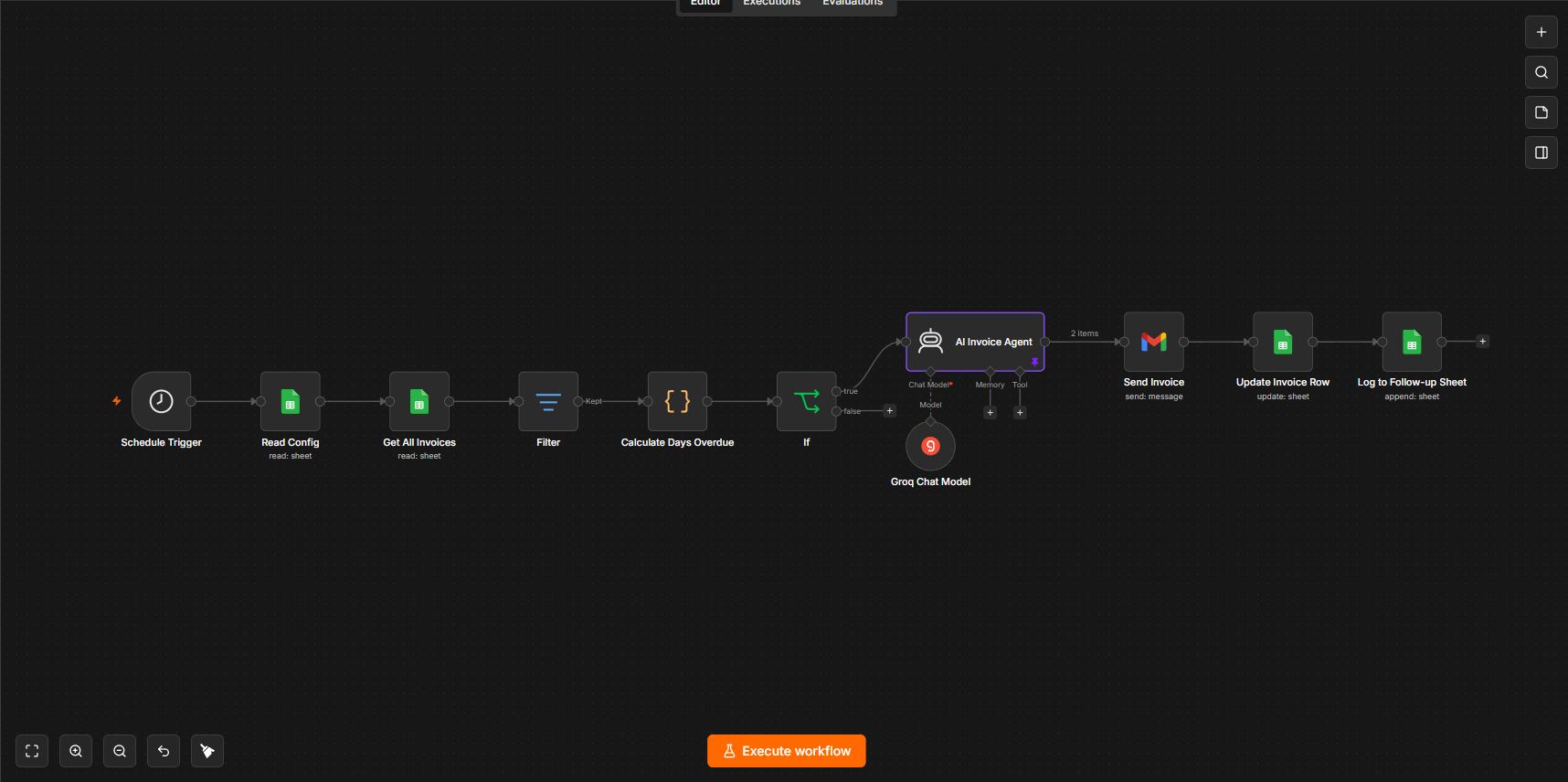
A scheduled invoice workflow with overdue checks, generated messages and a follow-up log. The supplied diagrams document the configured connections, rather than verified production outcomes.

Scroll sideways to inspect the diagram. Zoom enlarges labels; Reset zoom restores this preview.
Architecture summary · read alongside the source
- Read invoice records
- Check overdue status
- Prepare a message
- Send & record
Inside the processing logic
Read invoice records
- A Schedule Trigger starts the visible workflow.
- ReadConfig and Get All Invoices read Google Sheets data.
- A Filter node appears before the overdue calculation.
Check overdue status
- Calculate Days Overdue is a code node.
- An If node follows the calculation.
- Exact overdue thresholds and scheduling settings are not visible.
Prepare a message
- The selected branch reaches an AI Invoice Agent.
- The agent is connected to a Groq chat model.
- The screenshot does not reveal the message prompt or collection policy.
Send & record
- A Gmail Send Invoice node follows the AI agent.
- Update Invoice Row writes back to Google Sheets.
- Log to Follow-up Sheet records the follow-up step.
Step through the explanation
Dennice, an original illustrated robot guide, walks through the diagram. Start with Next, or choose autoplay. Captions and a full transcript are included; sound is optional.
Source evidence
These are the supplied local files used to write this explanation. Node labels and connections are visible; exported workflow JSON and execution logs were not supplied.
Visible outputs
An invoice email, an updated invoice row and a follow-up sheet entry.
These outputs are represented by nodes in the source. Delivery success and business results require execution evidence.
What this case study does—and doesn't—verify
The diagram supports the visible invoice-processing sequence. Successful delivery, payments recovered and time saved are not evidenced. Recipient checks and approved reminder wording need verification before use.
Next validation steps
Before operational use, I would inspect the workflow export, confirm credentials and permissions, test representative inputs and error paths, and review the outgoing messages with the intended user. These are proposed checks, not completed workflow execution tests.